> For the complete documentation index, see [llms.txt](https://docs.candelacharts.com/llms.txt). Markdown versions of documentation pages are available by appending `.md` to page URLs; this page is available as [Markdown](https://docs.candelacharts.com/investing/risk-and-portfolio-management/ath-drawdown/usage.md).
# Usage
ATH Drawdown Usage
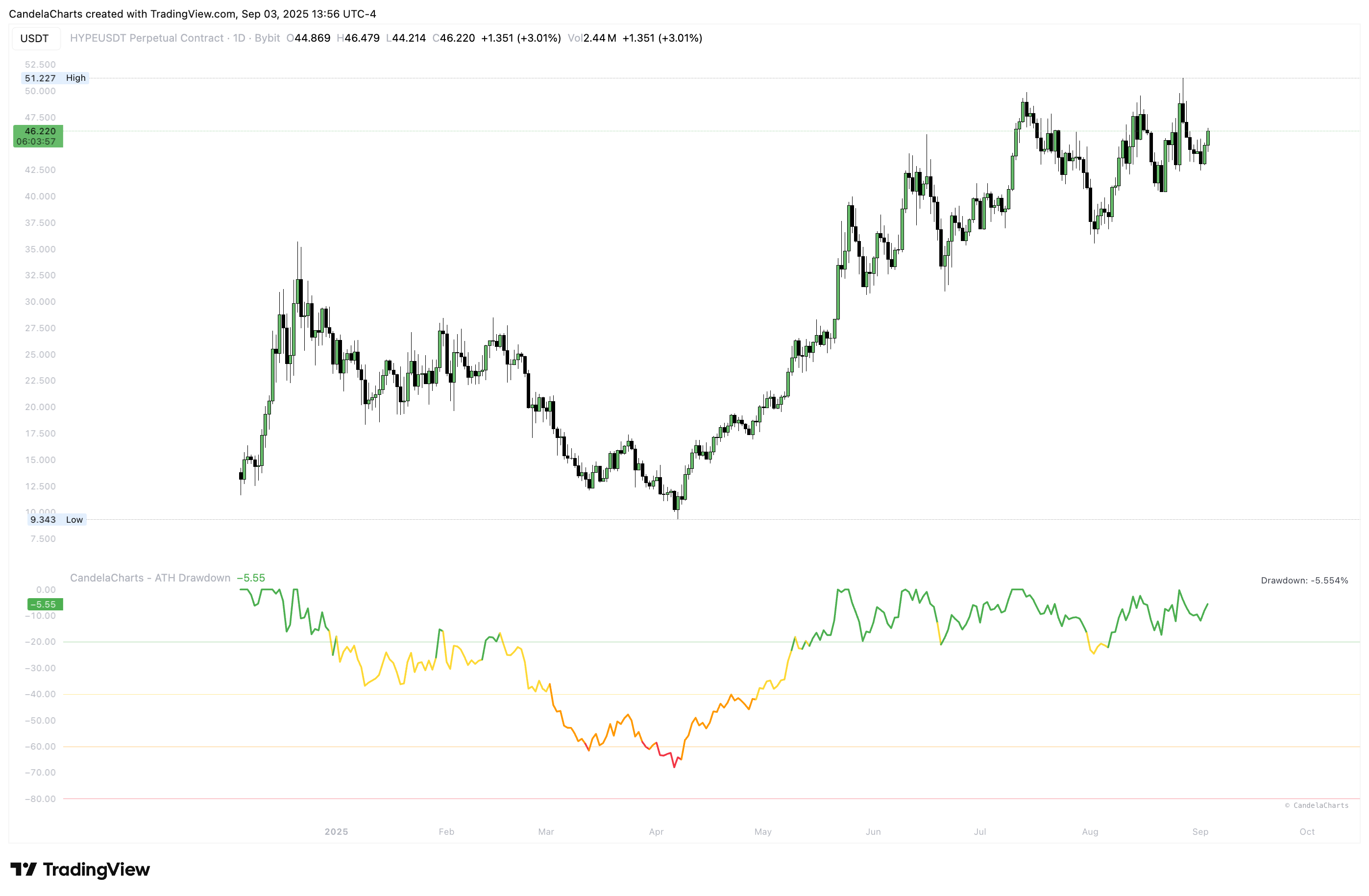
The indicator computes ATH from the first bar in view—then choose whether ATH should reference Close (more conservative) or High (includes wicks). Keep the study in its own pane (overlay = false) for a clean read.
If you prefer a smoother curve, apply a small EMA length to the drawdown percentage (for example 3–8) to emphasize regime shifts; set smoothing to 0 to view the raw series. Turn on the gridlines at −20%, −40%, −60%, and −80% to create intuitive risk bands, and use the built-in table to monitor the latest drawdown value at a glance.
To get proactive signals, enable the “Alert 70–80%” option and create an alert on the condition “Drawdown between 70% and 80%,” set to Once per bar close on your anchor timeframe. If notifications feel noisy, step up the timeframe or add a touch more smoothing; the default alert message is “ATH Drawdown is between 70% and 80%.”
For practical workflows, treat weekly or daily charts with light smoothing as a cycle map (near 0% suggests late expansion; below −60% reflects deep retrace); build DCA ladders by committing to accumulate below a chosen band (e.g., −60%) and overweight near capitulation (−70% to −80%); compare multiple symbols side by side to see which assets are early vs. late in their cycles; and gate reversal setups so they’re only considered once drawdown sits beneath your threshold and market structure agrees.
Note that switching symbols or loading more history can reveal an earlier or higher ATH and slightly shift the drawdown baseline; for consistency, use data sources with the most complete history available.
---
# Agent Instructions
This documentation is published with GitBook. GitBook is the documentation platform designed so that both humans and AI agents can read, navigate, and reason over technical content effectively. Learn more at gitbook.com.
## Querying This Documentation
If you need additional information that is not directly available in this page, you can query the documentation by asking a question.
Perform an HTTP GET request on the following URL with the `ask` and `goal` query parameters:
```
GET https://docs.candelacharts.com/investing/risk-and-portfolio-management/ath-drawdown/usage.md?ask=&goal=
```
`ask` is the immediate question: it should be specific, self-contained, and written in natural language.
`goal` is what the user is ultimately trying to achieve, the reason they need the answer. Sharing it helps GitBook give you a better, more relevant answer. A goal is most helpful when it describes the outcome the user wants rather than restating the question. For example, with `ask=how do I create an API token`, a goal like `automate deployments from our CI pipeline` lets GitBook tailor the answer to that use case.
The response will contain a direct answer to the question and relevant excerpts and sources from the documentation.
Use this mechanism when the answer is not explicitly present in the current page, you need clarification or additional context, or you want to retrieve related documentation sections.