> For the complete documentation index, see [llms.txt](https://docs.candelacharts.com/llms.txt). Markdown versions of documentation pages are available by appending `.md` to page URLs; this page is available as [Markdown](https://docs.candelacharts.com/models/amd-model/components.md).
# Components
AMD Model Components
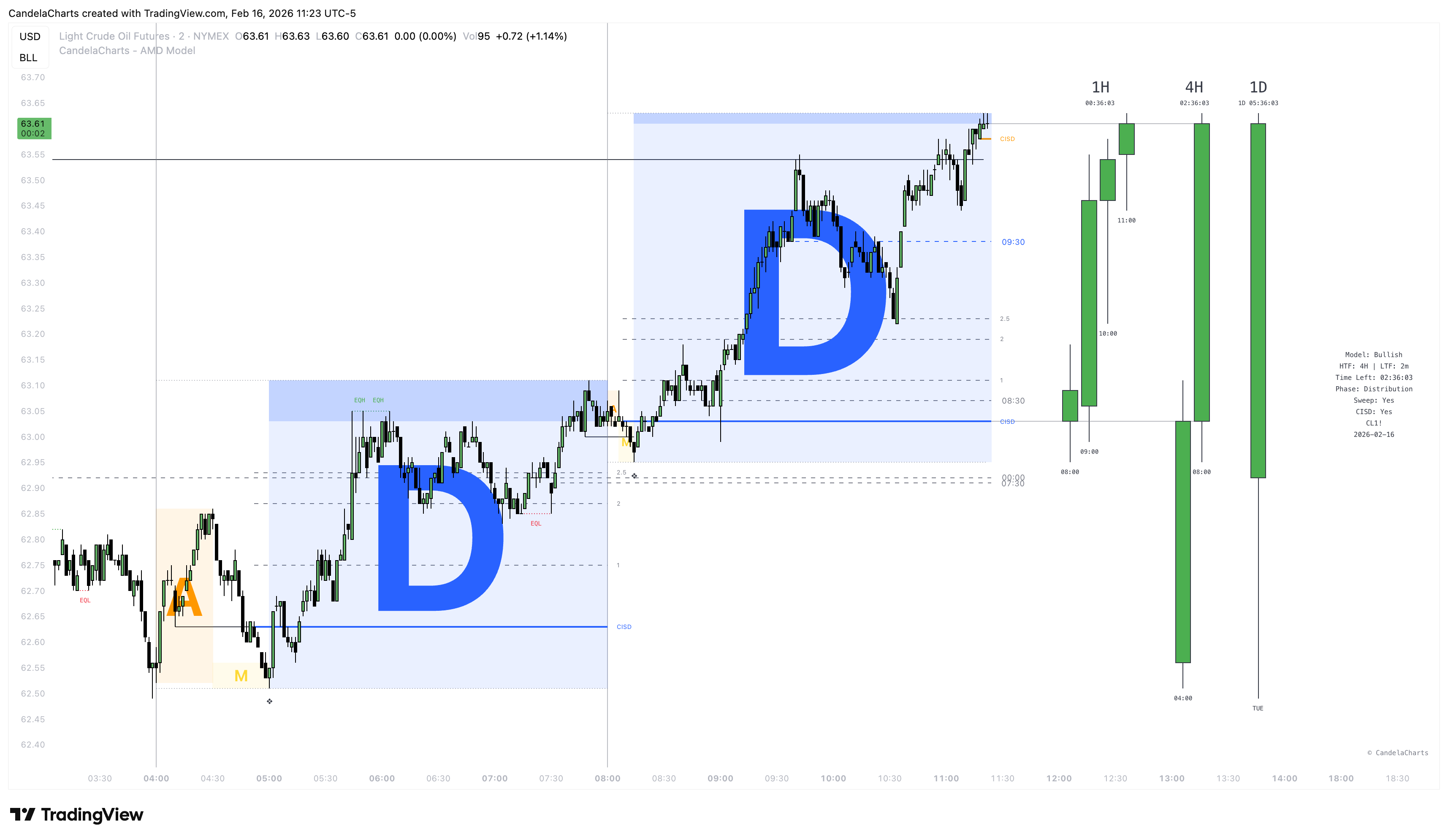
The AMD Model projects several visual components onto your chart. Understanding what each line and box represents is key to using the tool effectively.
### 1. AMD Phases (The Boxes)
The core of the indicator visualizes the three phases of price delivery for each HTF candle:
* **Accumulation (Blue Box)**: Represents the initial opening range or consolidation phase where positions are built.
* **Manipulation (Red Box)**: The "Judas Swing" or false move designed to induce traders into the wrong side of the market and capture liquidity. This phase typically sweeps the highs/lows of the accumulation range.
* **Distribution (Green Box)**: The true expansion move in the intended direction. This phase occurs after the manipulation is complete and structure has shifted.
### 2. HTF Candles
The indicator overlays **Higher Timeframe Candles** onto your chart.
* You can display up to 3 different HTF cycles (e.g., 4H, Daily, Weekly) simultaneously.
* These "Ghost Candles" allow you to see the overall trend and wicks of the higher timeframe without leaving your trading execution timeframe.
### 3. Change in State of Delivery (CISD)
* **What it is**: A confirmed structural shift indicating that the Manipulation phase is likely over and the Distribution phase has begun.
* **Visual**: Displayed as a horizontal line extending from the candle that confirmed the shift.
* **Significance**: A CISD Confirmation (often labeled with a diamond symbol ❖/◈) is a strong signal to look for entries in the direction of the distribution.
### 4. Liquidity Grabs
* **Visual**: Lines connecting the manipulated low/high to the point where liquidity was swept.
* **Function**: explicitly highlights exactly *where* and *when* the stops were run during the manipulation phase.
### 5. HTF Sweeps
* **HTF Sweeps**: Highlights when one HTF candle sweeps the high/low of the previous HTF candle.
* **Internal Sweeps**: Highlights smaller liquidity sweeps that occur *inside* the formation of the current HTF candle.
### 6. Key Open Prices (KOP)
Displays significant opening times that act as price magnets or reference points for algorithms.
* **00:00 (Midnight)**: True Day Open.
* **09:30**: NY Stock Exchange Open.
* **07:30 / 08:30**: Key data release or pre-market times.
* **14:00**: PM Session Open.
### 7. EQH / EQL (Equal Highs & Lows)
* Automatically detects and labels "Equal Highs" and "Equal Lows".
* These areas represent pools of resting liquidity (Stop Losses) that price is likely to gravitate towards.
### 8. Lower Timeframe (LTF) Structure Traces
* Draws the internal Open, High, Low, and Close paths of the HTF candle as distinct lines.
* Helps visualize the detailed "anatomy" of the higher timeframe bar.
### 9. Displacement
**Displacement** refers to energetic price movement that indicates a potential shift in market structure or the presence of institutional order flow. In the AMD Model, displacement is used to identify high-momentum candles that validate the "Distribution" phase.
### 10. Dashboard
A panel displaying the status of the current monitored timeframe, including:
* Time remaining until close.
* Current Phase (Accumulation, Manipulation, or Distribution).
* Trend Status (Bullish/Bearish).
---
# Agent Instructions
This documentation is published with GitBook. GitBook is the documentation platform designed so that both humans and AI agents can read, navigate, and reason over technical content effectively. Learn more at gitbook.com.
## Querying This Documentation
If you need additional information that is not directly available in this page, you can query the documentation dynamically by asking a question.
Perform an HTTP GET request on the current page URL with the `ask` query parameter, and the optional `goal` query parameter:
```
GET https://docs.candelacharts.com/models/amd-model/components.md?ask=&goal=
```
`ask` is the immediate question: it should be specific, self-contained, and written in natural language.
`goal` is optional and describes the broader end goal you are ultimately trying to accomplish on behalf of the user. GitBook uses it to tailor the answer towards what is most useful for that goal.
The response will contain a direct answer to the question and relevant excerpts and sources from the documentation.
Use this mechanism when the answer is not explicitly present in the current page, you need clarification or additional context, or you want to retrieve related documentation sections.