> For the complete documentation index, see [llms.txt](https://docs.candelacharts.com/llms.txt). Markdown versions of documentation pages are available by appending `.md` to page URLs; this page is available as [Markdown](https://docs.candelacharts.com/models/amd-model/dashboard.md).
# Dashboard
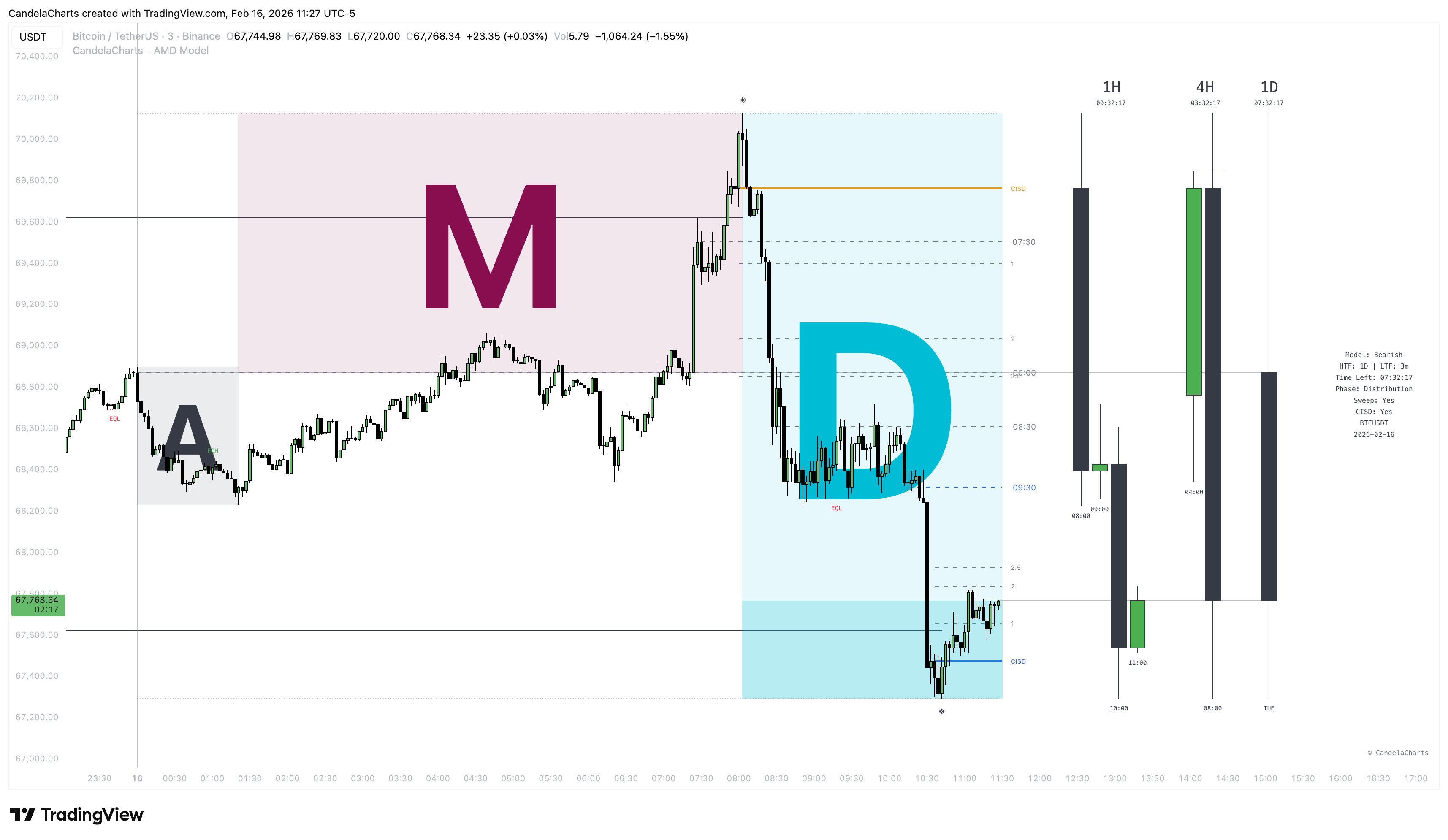
AMD Model Dashboard
The **AMD Dashboard** is your mission control center. It sits neatly on your chart, giving you a real-time snapshot of what the model is seeing without cluttering your view.
### Metrics at a Glance
The dashboard displays the following key information:
1. **Model Status:**
* **Bullish:** Indicates the market structure supports upward movement.
* **Bearish:** Indicates the market structure supports downward movement.
* **No Model Yet:** Waiting for clear structure to form.
2. **Current Phase:**
* Tells you if the market is currently in **Accumulation**, **Manipulation**, or **Distribution**. This helps you know *when* to trade (e.g., avoid trading during accumulation, look for entries during manipulation/distribution).
3. **Liquidity Grab Detected:**
* **Yes/No:** Instantly tells you if a liquidity grab has occurred in the current setup. A "Yes" is a strong confluence factor.
4. **CISD Status:**
* **Confirmed/Unconfirmed:** Lets you know if the change in delivery state has been validated. A confirmed CISD is often the "green light" for entry.
5. **Time Remaining:**
* A countdown timer showing exactly how much time is left in the current **HTF candle**. This is crucial for timing your entries relative to the candle close.
### Customization
You can easily customize the dashboard to fit your screen:
* **Position:** Move it to any corner or center of the chart (Top/Bottom, Left/Right/Center).
* **Size:** Scale it from Tiny to Huge.
* **Visibility:** Toggle it on or off if you prefer a cleaner chart.
---
# Agent Instructions
This documentation is published with GitBook. GitBook is the documentation platform designed so that both humans and AI agents can read, navigate, and reason over technical content effectively. Learn more at gitbook.com.
## Querying This Documentation
If you need additional information that is not directly available in this page, you can query the documentation dynamically by asking a question.
Perform an HTTP GET request on the current page URL with the `ask` query parameter, and the optional `goal` query parameter:
```
GET https://docs.candelacharts.com/models/amd-model/dashboard.md?ask=&goal=
```
`ask` is the immediate question: it should be specific, self-contained, and written in natural language.
`goal` is optional and describes the broader end goal you are ultimately trying to accomplish on behalf of the user. GitBook uses it to tailor the answer towards what is most useful for that goal.
The response will contain a direct answer to the question and relevant excerpts and sources from the documentation.
Use this mechanism when the answer is not explicitly present in the current page, you need clarification or additional context, or you want to retrieve related documentation sections.