> For the complete documentation index, see [llms.txt](https://docs.candelacharts.com/llms.txt). Markdown versions of documentation pages are available by appending `.md` to page URLs; this page is available as [Markdown](https://docs.candelacharts.com/models/sfp-model/components.md).
# Components
SFP Model Components
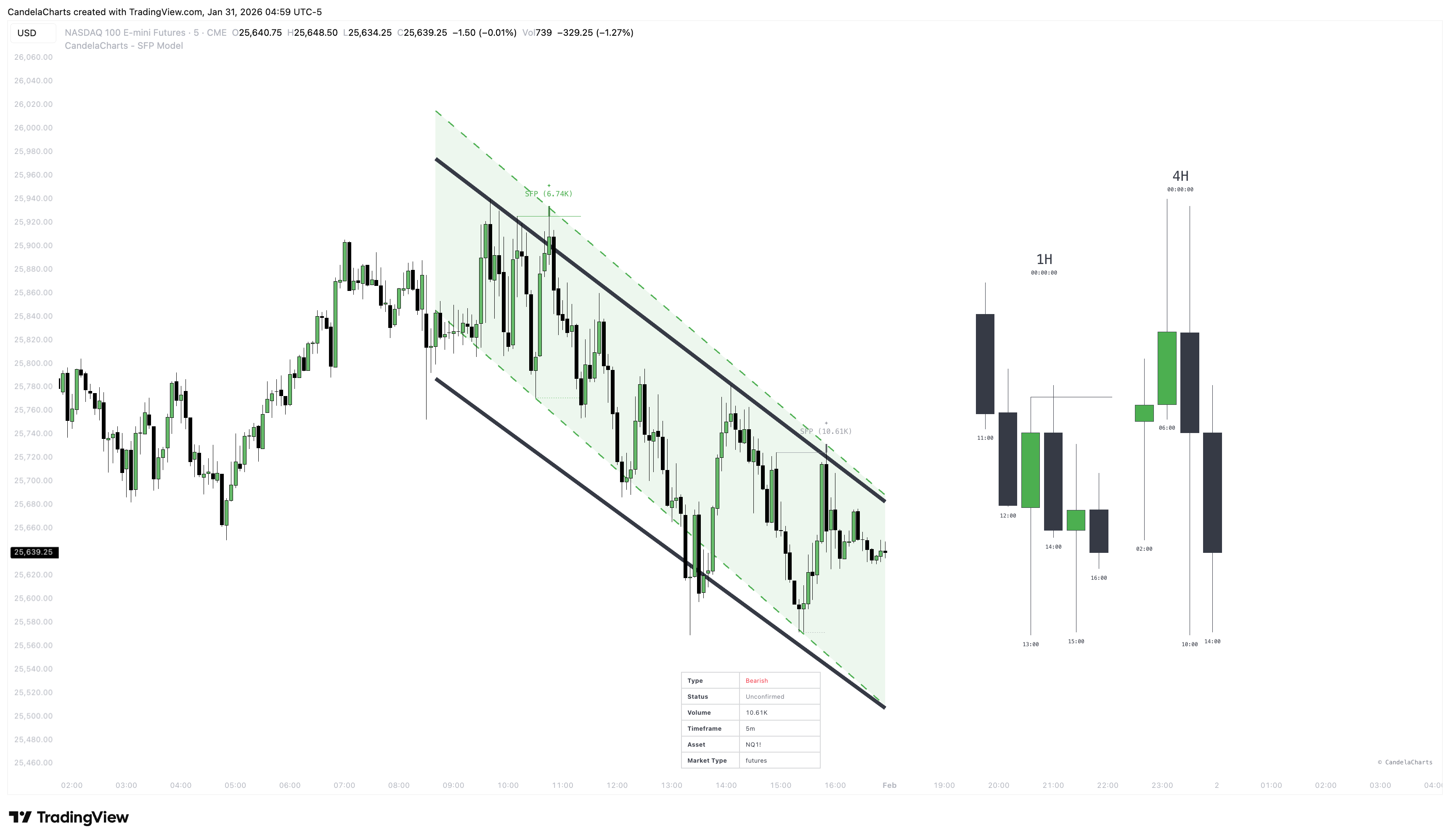
Below is an overview of the visual and analytical components that make up the CandelaCharts SFP Model. Each element is designed to enhance clarity, context, and decision-making by combining precise SFP detection with structural, multi-timeframe, and performance-based insights.
### **SFP Labels & Lines**
The core signal elements — horizontal line at swing level, dotted line at opposing level, thick colored line highlighting the sweep wick, plus a status-colored label showing volume and symbol. Controlled by “Show SFP” setting and “Last N” count.
### **Trendlines (upper and lower)**
Lines connecting recent pivot highs and recent pivot lows. Smoothed version used for partial-success evaluation and high-probability filtering. Enabled via Trend → Trendline or Both.
### **Regression Channel (upper and lower)**
5-segment linear regression fit used to define stronger success boundaries and high-probability filtering. Enabled via Trend → Channel or Both.
### **Higher Timeframe Candle Group I & II**
Miniature candles rendered on the chart showing selected higher timeframes. Includes body, wicks, sweep lines (when valid), timeframe label and remaining close time. Each group can be independently enabled.
### **Liquidity Sweep Lines**
Horizontal black lines drawn from HTF sweep points forward until invalidated or the group ends. Only non-removed and non-invalidated sweeps are shown.
### Imbalances (FVG & IFVG)
**FVG (Fair Value Gap):** Price imbalances left by aggressive market moves, often revisited as potential retracement or continuation zones.
**IFVG (Inverse Fair Value Gap):** Occurs when a previously created FVG is invalidated in the opposite direction, signaling a potential shift in market structure or order flow.
### **Dashboard**
Optional compact table (position configurable) displaying information about the most recent SFP: type, current status (colored), volume, swing price, opposing channel value, timeframe, asset, market type, and pivot length (in automatic mode).
### **Remaining Time Label**
Small label above/below HTF candle group showing formatted time left until the current higher timeframe candle closes.
---
# Agent Instructions
This documentation is published with GitBook. GitBook is the documentation platform designed so that both humans and AI agents can read, navigate, and reason over technical content effectively. Learn more at gitbook.com.
## Querying This Documentation
If you need additional information that is not directly available in this page, you can query the documentation by asking a question.
Perform an HTTP GET request on the following URL with the `ask` and `goal` query parameters:
```
GET https://docs.candelacharts.com/models/sfp-model/components.md?ask=&goal=
```
`ask` is the immediate question: it should be specific, self-contained, and written in natural language.
`goal` is what the user is ultimately trying to achieve, the reason they need the answer. Sharing it helps GitBook give you a better, more relevant answer. A goal is most helpful when it describes the outcome the user wants rather than restating the question. For example, with `ask=how do I create an API token`, a goal like `automate deployments from our CI pipeline` lets GitBook tailor the answer to that use case.
The response will contain a direct answer to the question and relevant excerpts and sources from the documentation.
Use this mechanism when the answer is not explicitly present in the current page, you need clarification or additional context, or you want to retrieve related documentation sections.