> For the complete documentation index, see [llms.txt](https://docs.candelacharts.com/llms.txt). Markdown versions of documentation pages are available by appending `.md` to page URLs; this page is available as [Markdown](https://docs.candelacharts.com/models/sfp-model/framework.md).
# Framework
SFP Model Framework
The SFP Model follows this logical sequence for every potential setup:
### **Pivot Detection**
A recent significant high (for bearish setups) or low (for bullish setups) is identified using your chosen pivot length:
* one of the 4 preset lengths
* your custom length
* or “Automatic” mode (scans multiple lengths and picks recent high-quality candidates)
### **Sweep Occurs**
Price makes a new extreme that goes beyond the pivot level (a “liquidity grab” or fakeout), but the candle body stays on the “safe” side of the pivot:
* Bearish SFP: high goes above previous swing high, but close stays below it
* Bullish SFP: low goes below previous swing low, but close stays above it This creates the classic “failure to follow through” pattern.
### **Confirmation Check**
The setup waits for price to close strongly in the reversal direction:
* Bullish → close above the highest point of the sweep candle
* Bearish → close below the lowest point of the sweep candle Once this happens → the SFP is **Confirmed** (turns blue).
### **Outcome Evaluation (after confirmation)**
The model now watches how far price moves in the expected direction:
* Price reaches the **first stdev** level → **Partial Success** (lime color)
* Price reaches the **second stdev** level (stronger target) → **Successful** (green color)
* Price turns around and breaks the original swing level **or** the sweep wick extreme in the wrong direction → **Failed** (red color)
### **Invalidation (can happen at any stage before full success)**
The setup is cancelled and marked **Invalidated** (orange) if any of these occur:
* An opposite-direction SFP appears before confirmation
* Price returns inside the original swing level without confirming
* The pattern becomes too old (roughly >500 bars) or violates internal range rules
### **Out-Of-Channel SFPs Filter (optional – enabled by default)**
When turned on, only SFPs are shown (and alerted) where at least one of the two key wicks — either the sweep wick or the formation/succession wick — actually touches or crosses the active boundary line.
* If both trendline and channel are enabled → the channel is preferred for this check. This significantly reduces noise and focuses on setups with structural context.
### **Best Combined With: IFVGs and FVGs**
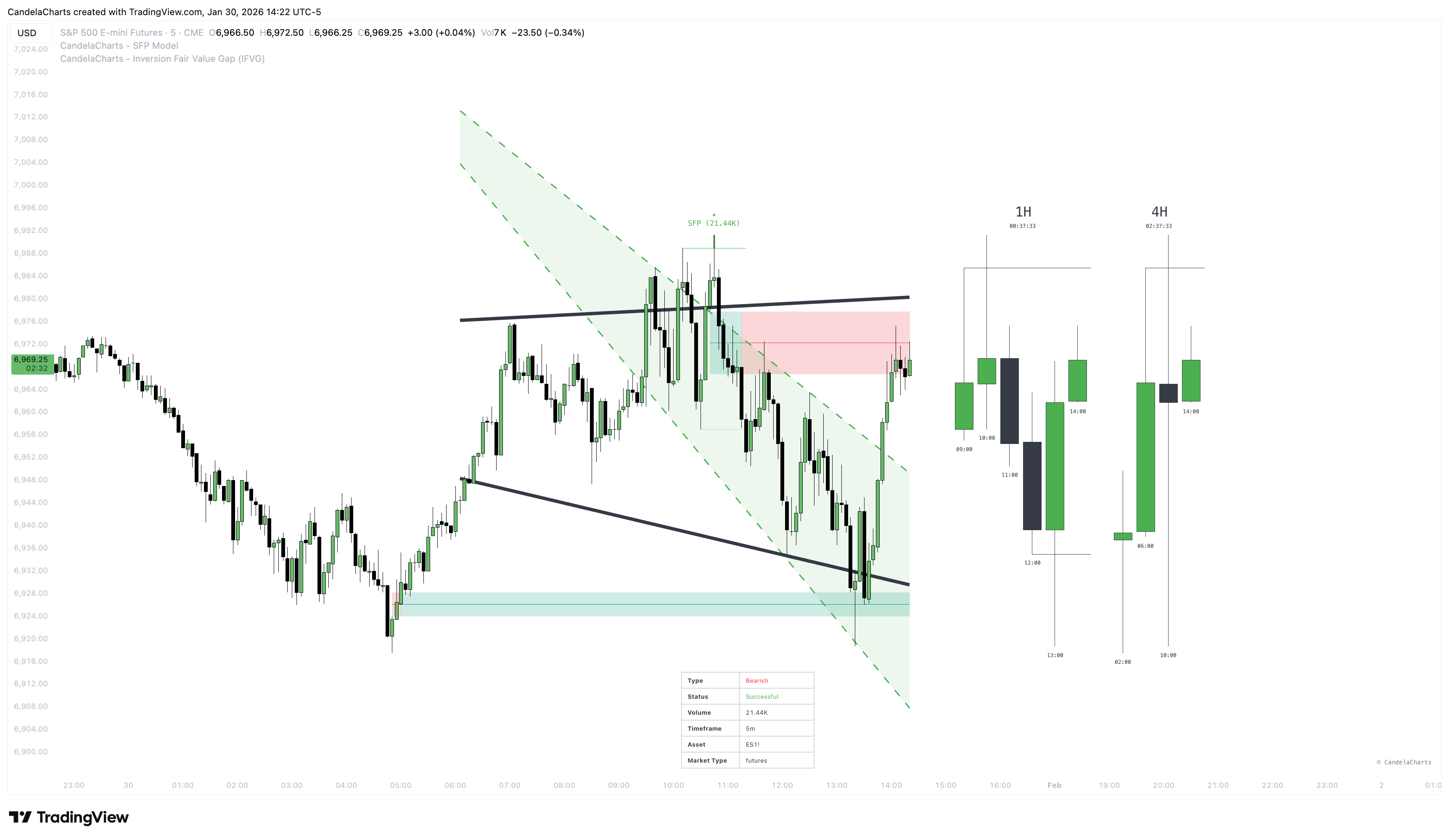
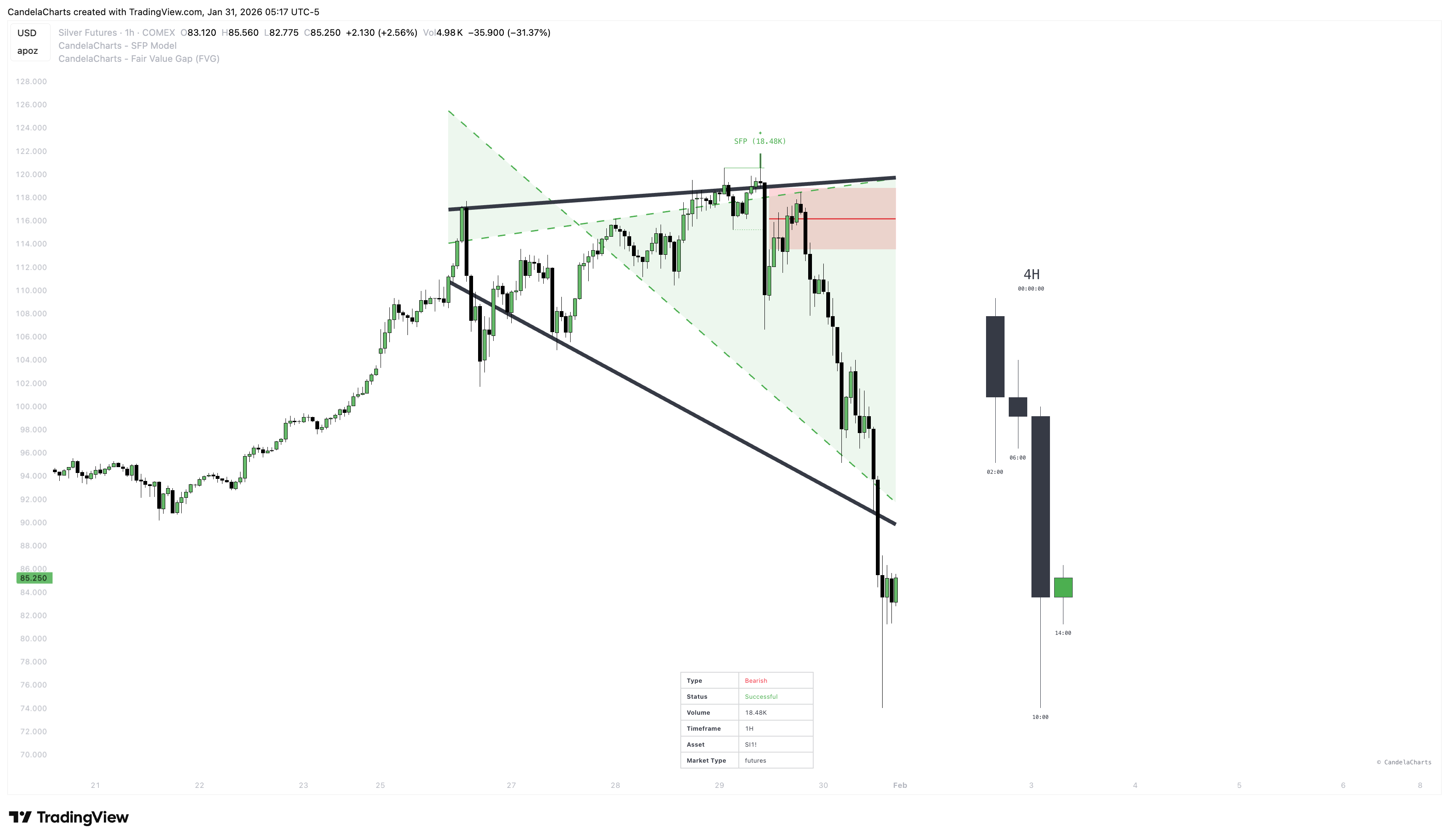
SFPs tend to deliver much stronger and more reliable signals when they form **near**, **at the edge of**, or **directly inside** Fair Value Gaps (FVGs) or Inversion Fair Value Gaps zones (IFVGs).
These imbalance areas frequently act as powerful **magnets** and high-probability **reaction zones**:
* A **bullish SFP** appearing at or near a **lower FVG/IFVG** very often triggers strong upward reversals.
* A **bearish SFP** appearing at or near an **upper FVG/IFVG** very often triggers strong downward reversals.
**Practical trading applications** of this confluence:
* Use the **SFP confirmation** as the primary **entry trigger**.
* Treat nearby/underlying **FVGs and IFVGs** as:
* directional confluence (bias confirmation)
* realistic **target zones** (price tends to fill or react at these levels)
* clear **invalidation levels** (price closing through the gap often kills the setup)
**SFP + FVG/IFVG** is widely regarded as one of the cleanest and most effective confluences when trading this model in live markets.
#### IFVG Example
#### FVG Example
{% hint style="info" %}
This combination (SFP + FVG/IFVG) is one of the most popular and effective ways to trade the model in real markets.
{% endhint %}
This flow ensures every SFP is tracked from birth → confirmation → success/failure/invalidation with clear visual feedback at each stage.
---
# Agent Instructions
This documentation is published with GitBook. GitBook is the documentation platform designed so that both humans and AI agents can read, navigate, and reason over technical content effectively. Learn more at gitbook.com.
## Querying This Documentation
If you need additional information that is not directly available in this page, you can query the documentation dynamically by asking a question.
Perform an HTTP GET request on the current page URL with the `ask` query parameter, and the optional `goal` query parameter:
```
GET https://docs.candelacharts.com/models/sfp-model/framework.md?ask=&goal=
```
`ask` is the immediate question: it should be specific, self-contained, and written in natural language.
`goal` is optional and describes the broader end goal you are ultimately trying to accomplish on behalf of the user. GitBook uses it to tailor the answer towards what is most useful for that goal.
The response will contain a direct answer to the question and relevant excerpts and sources from the documentation.
Use this mechanism when the answer is not explicitly present in the current page, you need clarification or additional context, or you want to retrieve related documentation sections.